


logging库日志级别
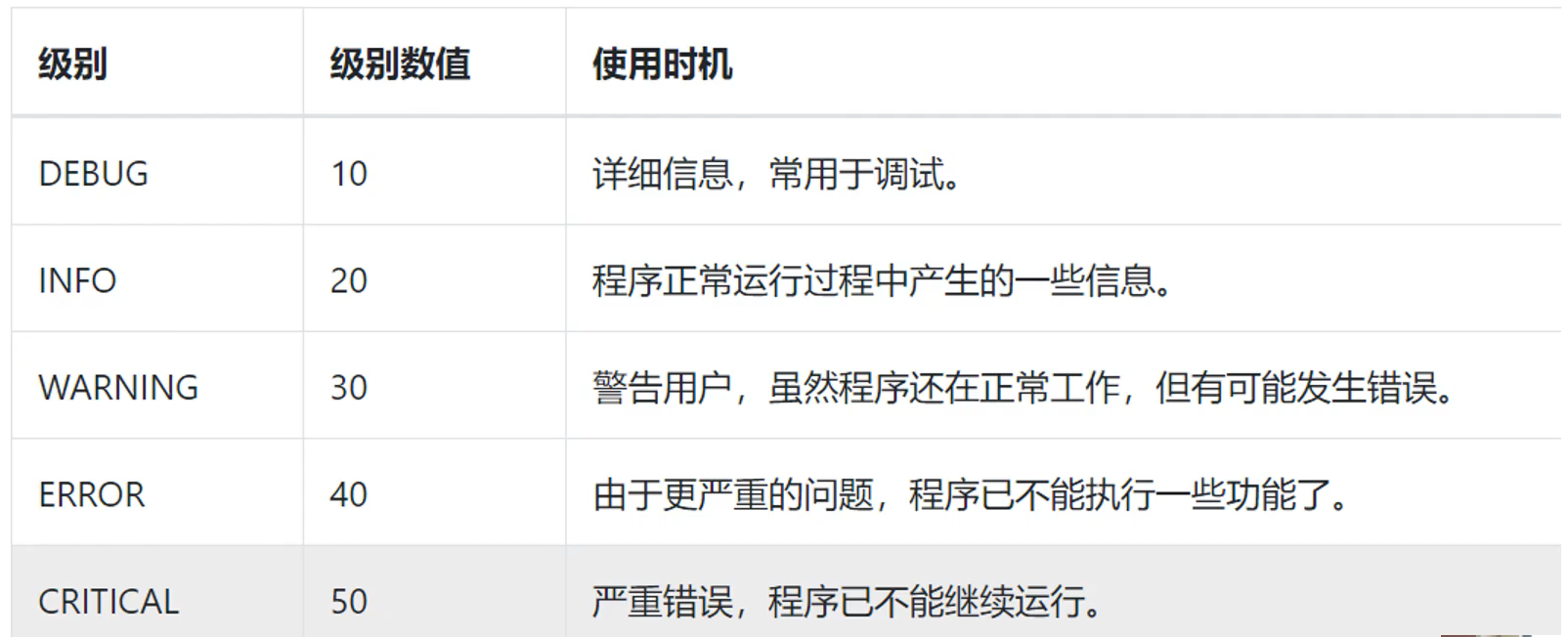
1. 基础用法(直接将日志内容输出到控制台)
使用baseConfig()来制定日志输出的级别,默认只输入warning以上级别的日志信息
import logging

logging.basicConfig(level=logging.DEBUG)    # set the logging level to DEBUG,Default is warning.

logging.debug("This is a debug message")
logging.info("This is an info message")
logging.warning("This is a warning message")
logging.error("This is an error message")
logging.critical("This is a critical message")
print("This is an info message")   # 测试打印的信息,位置不一定是从上到下,而是logging和print函数谁先占用了cpu就先输出谁的信息
1.1 运行演示
2. 输出日志内容到文件
import logging

logging.basicConfig(filename='example.log', filemode='w', level=logging.DEBUG)    # output log to file,default is an append(a) mode,is not write(w) mode.

logging.debug("This is a debug message")
logging.info("This is an info message")
logging.warning("This is a warning message")
logging.error("This is an 错误 message")
logging.critical("This is a critical message")


评论区